Guides · Getting found · 1 of 12
Why your app doesn't show up in App Store search
A new app goes missing from search because it is brand new, because you searched another country's store, or because its listing gives Apple nothing to match.
You released the app, you typed its name into the App Store, and nothing came back. It happens to many new apps, and the app itself is usually fine.
Why can’t I find my own app in App Store search?
There are three ordinary reasons. Check them in this order: the first costs nothing to check, and the third is the one that needs real work.
- The app is brand new. This is the most common reason. Search has not caught up with the app yet, and the fix is to wait.
- You are searching a store the app is not in. It may be another country’s store, or the iPhone App Store when your app is a Mac app. Search a store where the app is on sale.
- The listing gives Apple nothing to match. The name, subtitle and keyword field do not say what the app does. Rewrite them in words a person would type.
A new app takes a while to appear
A listing goes live before search catches up with it. Your app can be on sale, and its page can open from a direct link, while a search for its name still comes back empty. A thread on Apple’s developer forums describes exactly this: the direct link works, the search does not.
Apple does not publish how long that gap lasts. Nobody outside Apple can give you a number of days.
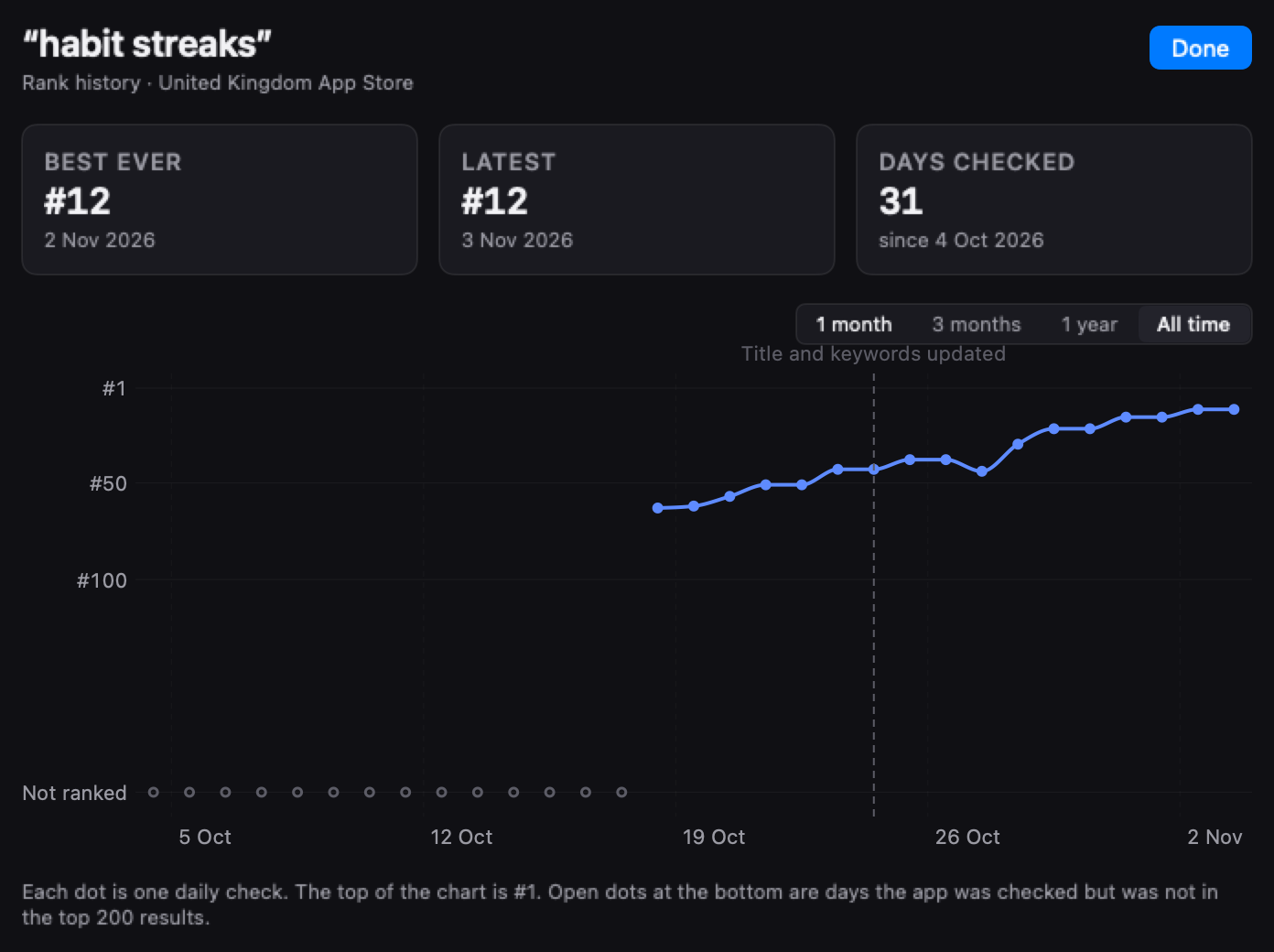
What is normal: a brand new app missing from search for some days, then appearing low for its own name, then climbing. In the first weeks a position can be 180 one day and gone the next. Neither reading says anything yet.
Waiting has a practical reason too. Your name, subtitle and keyword field change only when you ship a new version. A rewrite on day one costs you another release and another review, and it spends the days you needed to see where the first text landed.
You may be searching a store your app is not in
Each country has its own App Store, with its own search results. Your app turns up in a country’s results only if it is on sale in that country.
Two mismatches catch many developers.
The country. Your iPhone shows the store of the country your Apple Account belongs to. If you put the app on sale in the United States and your account is in another country, you are searching a store your app is not in. A search from a friend’s phone abroad tells you about their country’s store, never yours.
iPhone or Mac. The iPhone and iPad App Store and the Mac App Store are separate stores with separate search. A Mac app does not come up in the iPhone App Store. An iPhone app can come up on an Apple silicon Mac, under iPhone & iPad Apps, unless you turned that off in App Store Connect.
To check both, open App Store Connect (Apple’s website for managing your apps), open your app, and look at Pricing and Availability. The countries listed there are the stores you can be found in. Then search from a device signed in to one of them, in the right store, iPhone or Mac.
The guide on how your app ranks in every country goes further into reading another country’s store.
Your listing may give Apple nothing to match
Apple says its search results are based on text relevance, “matches for your app’s title, subtitle, keywords, and primary category”, and on what people do, such as downloads, ratings and reviews. Three of those are fields you write in App Store Connect:
- The app name, up to 30 characters, shown on your page and in search results.
- The subtitle, up to 30 characters, the short line under the name.
- The keyword field, up to 100 characters, a list of words that Apple reads and no visitor ever sees.
Apple does not say how words from different fields combine, or whether every word someone types has to be there. A listing whose fields never say what the app does, in words a person would type, gives search little to match.
That explains a lot of missing apps. The name is an invented word, the subtitle is a slogan, and the keyword field was left empty. The listing never says what the app does in words a person would type.
A search for your exact name tells you whether search has caught up with your app. It tells you little else. The people typing your exact name already know your app. A search for what the app does is the real test.
The guide on the name, subtitle and keyword field walks through each field and the characters people waste.
When it is a real problem
One test separates patience from a fault. If the app has been on sale for several weeks and a search for its exact name, in a store where it is on sale, still does not find it, search is not catching up. Something in the listing or the availability needs fixing.
Walk it top to bottom:
- Is the app on sale, in the country you are searching?
- Are you searching the right store, iPhone or Mac?
- Does the name hold the words you expect people to find you by, or an invented word alone?
- Does the subtitle say what the app does?
- Is the keyword field filled in, with words a stranger would type?
Fix what you find and ship it with your next version. Then leave it for a couple of weeks. Positions move over days and weeks after a change goes live. A second rewrite a day later throws away the only evidence you had about the first one. How long it takes covers that wait.
If all five checks pass and the exact name still finds nothing after weeks, contact Apple Developer Support from your developer account and give them the app’s name, its Apple ID (the number in its App Store address) and the country you searched.
Do this today
Run three searches and write each one down with today’s date:
- Your exact app name, in a country where the app is on sale. Found means search has caught up. Not found, in the first days, is normal.
- The two or three words that describe what your app does, the search you most want to be found by. Count down the results to your app and write the position. Past the first few screens, write “not found”.
- The same two searches in a second country where you sell, from a device signed in to that country or by asking someone there. A different answer there is normal; each country is its own store.
Do the same three searches a week from now. Two dated readings tell you more than ten searches on one day.
In ASOblick
ASOblick runs that search for you every day. You add your app and the searches you want to be found by. Every day it asks Apple’s public search for the first 200 results of each search, in each country you chose, and writes down where your app came up. Every reading is kept on your Mac, so the history shows the day your app first came up for each search.
Two hundred is the most Apple’s public search answers for one search. If your app is not among those 200, the table writes “Not ranked”. The App Store app on a phone personalizes some results, so a shopper there can see your app in a different position from the one ASOblick writes down. To see how closely the two run, search once on a phone in that country.
If your app is not out yet, add it as a planned app and pick its searches now: each one shows its popularity and difficulty, both ASOblick’s own estimates, before launch. On launch day you click My App Is Live and paste your App Store link. The first rank check runs that minute, and every search you picked carries over.
Free for your first app, its five keywords checked every day.
Next on the path: How to pick App Store keywords